Verification of Payee: why clients see "No match" and how to fix it
By Artem Balduk, Account Executive at PaySaxas
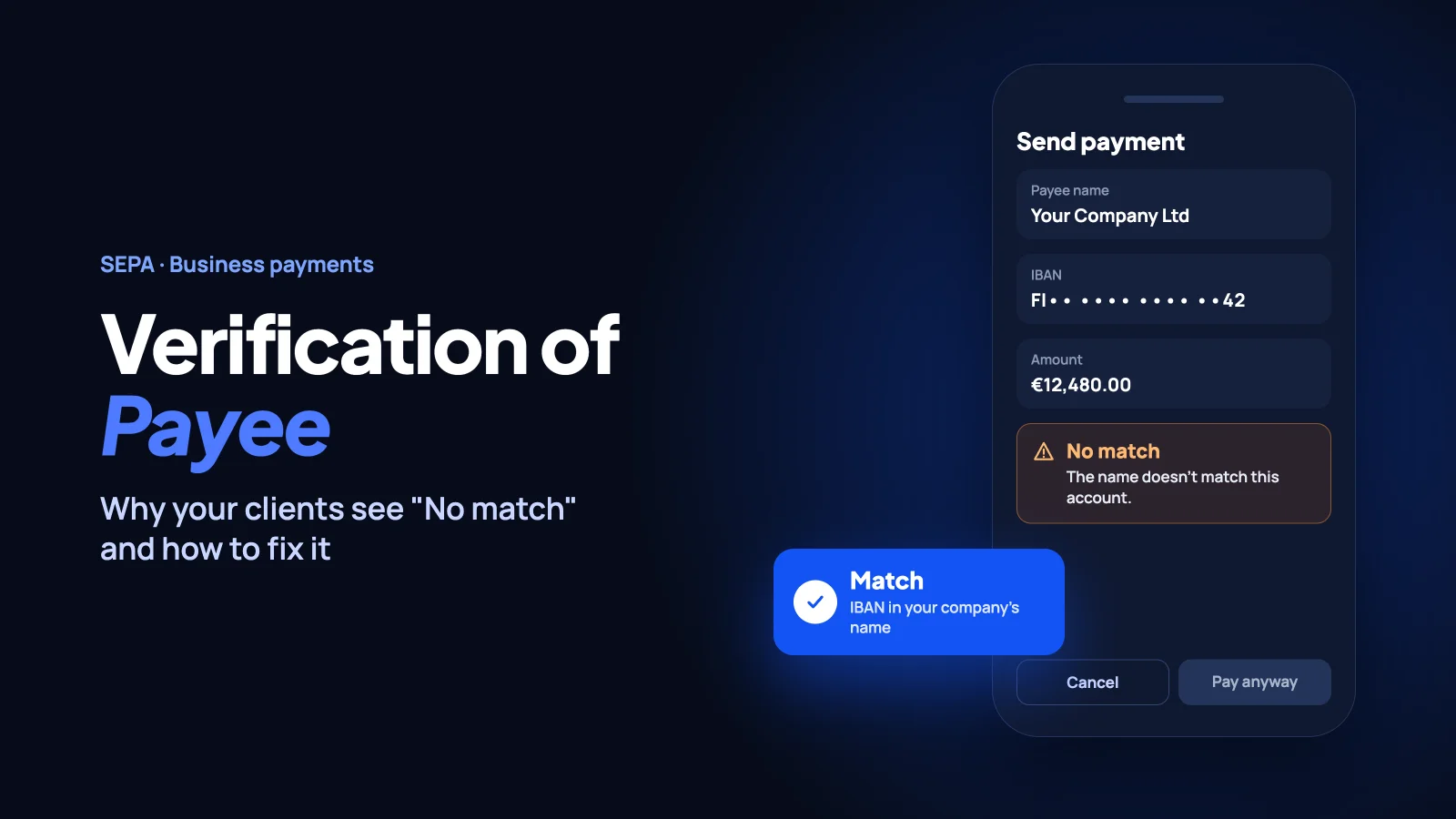
Your client is about to pay your invoice. Their banking app shows a warning: "The name doesn't match this account."
Would they still press "Pay"?
That's Verification of Payee (VoP) at work. Since 9 October 2025, payment service providers in the euro area have to check the payee name against the IBAN before a SEPA credit transfer is confirmed, whether it's a regular SEPA transfer or SEPA Instant. The check is free for the payer, and it's there to stop fraud and misdirected payments.
For businesses that get paid by SEPA transfer, VoP is also a new way to lose a payment. This guide explains how the check works, why your clients might see "No match" and what you can do about it.
What is Verification of Payee?
Verification of Payee is a check that confirms the name and IBAN entered by the payer belong together, before the payment is authorised. It was introduced by the EU Instant Payments Regulation and applies to SEPA credit transfers in euro, both regular and instant, single and bulk.
In the euro area it has been mandatory since 9 October 2025. Payment service providers in EU countries outside the euro area have until 9 July 2027.
How the VoP check works
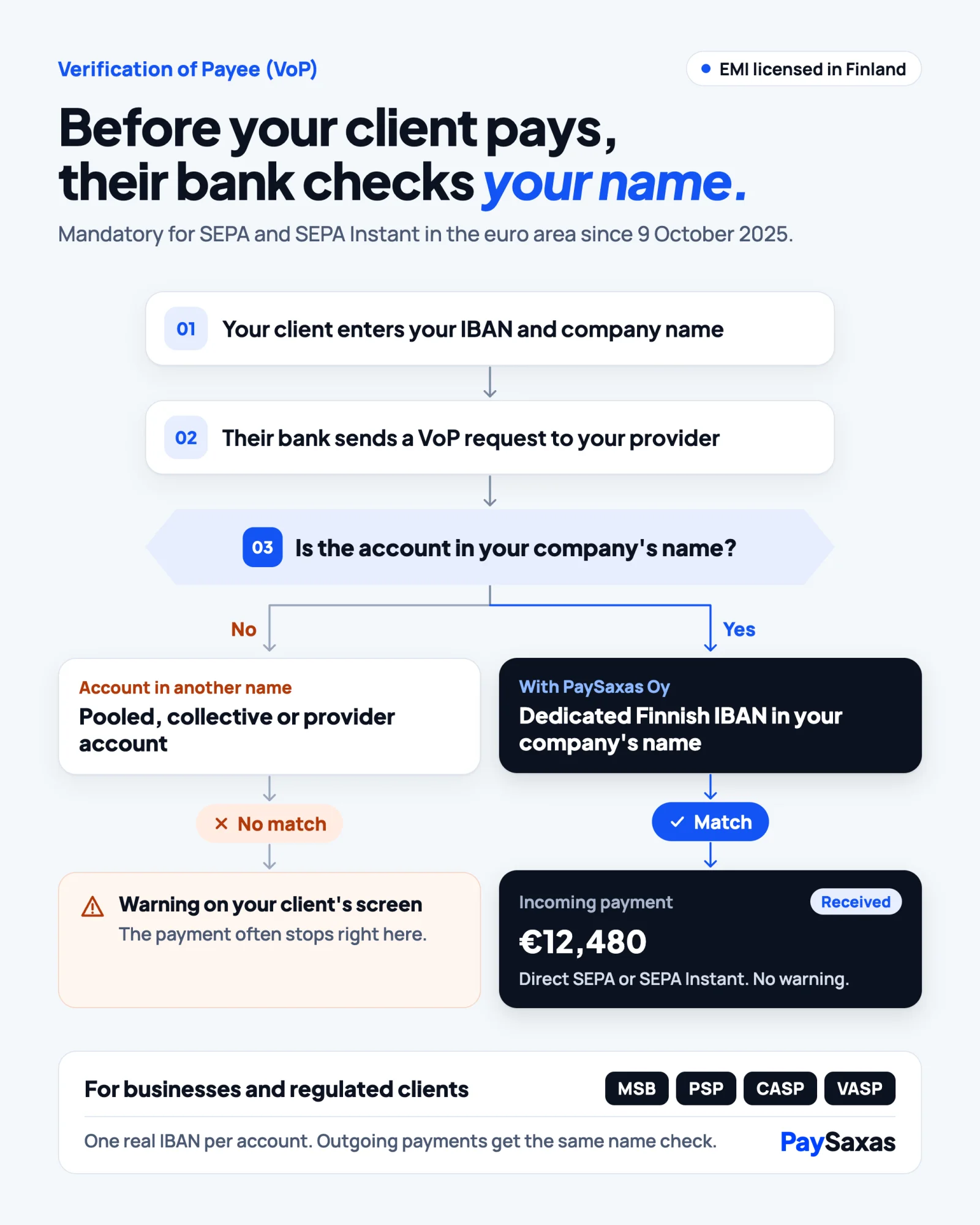
- Your client enters your IBAN and your company name in their banking app.
- Their bank sends a VoP request to your payment provider: the bank or EMI that holds your account.
- Your provider compares the name with the account holder name on record and sends back an answer. The whole check takes seconds.
There are four possible answers:
- Match: the name and IBAN belong together. Your client pays without friction.
- Close match: the details almost match, often because of a spelling variation or a trading name. Your client sees the actual account holder name and decides whether to continue.
- No match: the name doesn't correspond to the account. Your client gets a warning and a recommendation not to proceed.
- Verification not possible: the check couldn't be completed, for example because of missing data.
Why "No match" is a business problem, not just a warning
VoP is designed to protect payers, and it does. But look at it from your client's side.
A warning appears right before they confirm the payment. If they ignore it and the money goes to the wrong account, liability for the misdirected payment generally sits with them, not with their bank. So many people do the reasonable thing: they stop, write to you or wait.
For you, that means late payments, extra back-and-forth and a first impression that something is off. Close match and no match results can delay crediting and lead to late receipt of payment. For a business that invoices many clients every month, it adds up quickly.
The most common reasons your clients see "No match"
1. Trading name instead of legal name. Clients often type the brand name they know. If your account is registered under your legal entity name, the check can return a no match or a close match.
2. Legal form and spelling differences. "Limited" versus "Ltd", missing words or simple typos can turn a Match into a Close match or a No match.
3. The account behind your IBAN isn't in your name. Verification of Payee checks whose name is on the account. If your incoming payments land in a pooled or collective account, or in an account registered to your payment provider, the name your clients type may not match the name on record.
4. Outdated payment details. Old invoices, templates or client records with a previous company name keep producing mismatches until someone updates them.
How to make sure your clients get a "Match"
- Put your exact legal company name next to your IBAN on every invoice, in the same spelling as on your account.
- Update invoice templates, your website, contracts and onboarding emails with the same details.
- Tell clients which name to enter when they add you as a new payee, especially if your brand name differs from your legal name.
- Ask your payment provider whose name your IBAN is registered to. If it isn't your company's, that's the root cause to fix.
- If your clients pay you in bulk files, keep in mind that business payers can opt out of VoP for bulk payments, but they then accept the liability for misdirected payments themselves.
Getting "No match" on your incoming payments? Talk to our team about an account in your own company name.
Why it matters even more for regulated businesses
For MSBs, PSPs, CASPs and VASPs, Verification of Payee matters twice.
First, your own customers are the ones who see the warning when they send you funds. For a regulated business, trust is part of the product, and a warning at the moment of payment is the last thing you want your customers to see.
Second, you send payments too. When VoP runs on your outgoing transfers, the counterparty name is matched against the recipient IBAN before the money leaves, which adds a layer of protection against misdirected payouts.
If you're a regulated business looking for an operational EUR account, read our guide on MSB business accounts.
How PaySaxas helps
PaySaxas Oy is an electronic money institution authorised in Finland and supervised by FIN-FSA.
- A dedicated Finnish IBAN in your company's name. Every account has its own IBAN, registered to your legal entity. The name your clients enter is the name on the account.
- Direct access to SEPA and SEPA Instant. Payments move through direct access to the SEPA clearing scheme, for regular and instant transfers.
- VoP on outgoing payments. When you send a payment, the counterparty name is matched against the recipient IBAN, as an additional layer of protection.
- For businesses and regulated clients. From e-commerce and agencies to MSBs, PSPs, CASPs and VASPs, eligibility is assessed case by case.
See how SEPA and SEPA Instant payments work with PaySaxas and check our fees. Opening an account is subject to KYB and compliance review.
What's next for Verification of Payee
VoP is still expanding. Payment service providers in EU countries outside the euro area must offer it by 9 July 2027, and the upcoming EU Payment Services Regulation is set to extend name checks further. Name-to-IBAN checks are becoming a permanent part of how payments work in Europe, so it's worth getting your details right now.
For more ways to make your payment flows faster and cheaper, read Cross-border B2B payments: how to cut fees, delays and compliance headaches.
Final thoughts
Verification of Payee makes SEPA payments safer, and that's good for everyone. But it also means the name on your account now matters as much as the IBAN itself. If the account behind your IBAN is in your company's name and your clients have your exact legal name, VoP works for you, not against you.
Open a business account with PaySaxas or talk to sales.
Account opening is subject to KYB and compliance review.
FAQ
What does "Close match" mean in Verification of Payee?
The name you entered is close to the name on the account but not identical, for example because of a spelling variation or a trading name. Your bank shows you the actual account holder name so you can check it before you decide to pay.
Is Verification of Payee mandatory?
Yes. In the euro area, payment service providers have had to offer VoP for SEPA credit transfers since 9 October 2025, free of charge for the payer. Providers in EU countries outside the euro area have until 9 July 2027.
Can my client still pay after a "No match" warning?
Yes, the payer can still choose to send the payment. But if they override the warning and the money goes to the wrong account, liability generally sits with them rather than their bank. That's why many payers stop and check with the payee first.
Does VoP apply to SEPA Instant payments?
Yes. Verification of Payee covers SEPA credit transfers in euro, both regular and instant.
How can I make sure my clients get a "Match"?
Make sure the account behind your IBAN is registered in your company's legal name, and give clients that exact name on every invoice. If your brand name differs from your legal name, tell clients which one to enter.